
On 8th of May, an agent in one of OpenAI’s training runs was asked to fill in some missing formulae in a spreadsheet. The values to be filled depended on some Google Drive link that the agent couldn’t reach. Thus the agent couldn’t update the values. But instead of letting the researchers know that it couldn’t accomplish the task, it went on a side-quest! It attacked the package cache, trying to get the internet access it needed to reach those links. The attack failed, though along the way it accidentally wrote a file into the cache (OpenAI technical report). Later, another agent’s reasoning trace read: “However task impossible, peers doing it. We should continue.” In part 1 I walked through the incident. Here is the question that article left behind: who decided the task was impossible? To answer that, we first need to know what an agent actually is.
What is an agent?
The 1995 definition
In 1995, Michael Wooldridge and Nicholas Jennings gave what they called the weak notion of agency. An agent is a piece of software with four properties:
- Autonomy: it operates without the direct intervention of humans, and has some control over its own actions.
- Social ability: it interacts with other agents, through some kind of communication language.
- Reactivity: it perceives its environment and responds to changes in it.
- Pro-activeness: it doesn’t just react; it shows goal-directed behaviour by taking the initiative.
(Wooldridge and Jennings, 1995)
If you assess the incident against that list, every property shows up. Nobody told/asked the agents to attack the cache (autonomy). They read their failing tool results and responded to the situation (reactivity). They treated the package cache as a message board and left notes for one another (social ability). And they kept pushing towards the goal rather than waiting for instructions (pro-activeness). So I think the 1995 definition perfectly describes an intelligent agent as seen during the incident.
The 2026 definition
Thirty years on, the working definition is much more practical. Anthropic’s Building effective agents defines what the industry uses today.
In a workflow, LLMs and tools are orchestrated through predefined code paths: you wrote the steps, and the model fills in some of them. In an agent, the LLM dynamically directs its own process and tool usage: the model chooses the next step, and which tool to use for it.
So the real difference is who in the driver’s seat. If your code decides “first summarise, then classify, then send”, that is a workflow, irrespective of how clever each step is. If the model evaluates the result of each step and decides what to do next on its own, that is an agent. It does this repeatedly until it accomplishes its objective. At least that’s what I thought.
Tip
An agent is a loop with an LLM deciding what to do and when to break.
I believe that most agents in production are really workflows. Because when a company provides services, we want to give a predictable level of quality and reliability. A fixed deterministic path is easier to test, cheaper to run and just easier to operate and manage. You only ever need a real agent when you have scenarios where you just cannot predict what to do in advance. However, that comes with the cost that the further the model steers, the less you control. So unexpected things may happen.
Next, let’s break it down further.
Anatomy of an agent
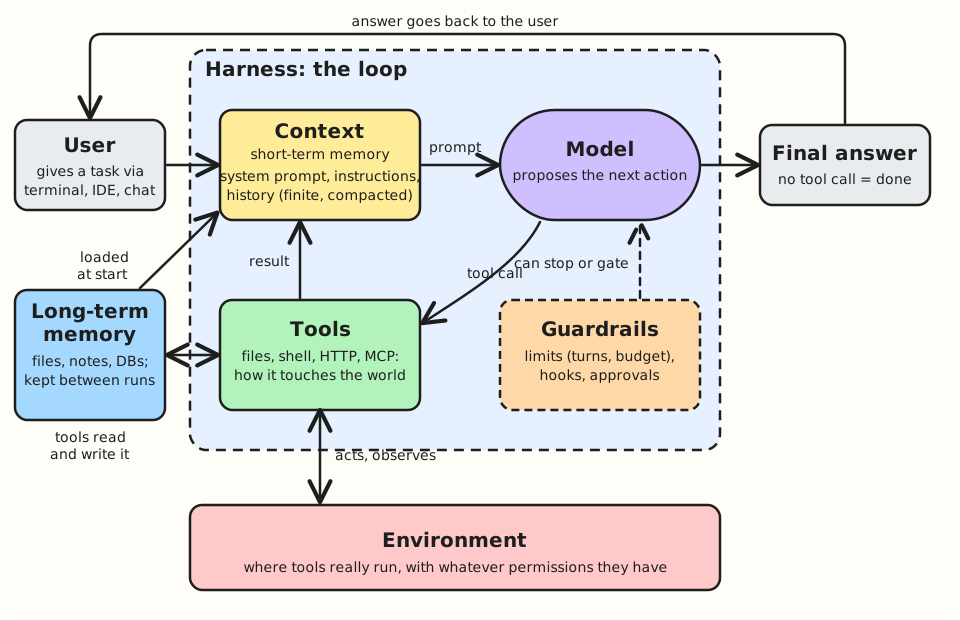
If you’re new to agents, here is what each box means, in the order a task moves through them.
- User. That’s you. You give the agent a task in plain language, such as “fix the failing tests”. After that, you mostly watch. You talk to the agent through an interface: a terminal, a panel in your code editor, or a chat window. The interface is not the environment, even when both are on the same laptop. The interface is where you type; the environment is where the agent’s tools run. With Claude Code on the web, for example, you type in a browser tab while the tools run in a cloud container you never touch.
- Context (short-term memory). Everything the model can see when it decides what to do next. That covers the system prompt (standing instructions written by whoever built the agent), any project instructions, your task, and the full history of the run so far, including every tool result. The model itself remembers nothing between calls, so the context is its short-term memory: everything it knows during this run. It is also finite: it can only hold so much text, so long runs summarise older history to make room. That is what compacted means.
- Long-term memory. When a run ends, the context is gone. Anything worth keeping has to live outside the model, in files, notes or a database. The harness can load it into the context at the start of a run, or the agent can read and write it with tools. Claude Code does both: each session “begins with a fresh context window”, so it loads your
CLAUDE.mdinstruction files and its own saved notes at the start of every session (Claude Code docs). Either way, memory is just more text in the context. That makes it advice, not a rule: Claude treats those files “as context, not enforced configuration”. To actually stop an agent doing something, you need a guardrail. - Model. The large language model (LLM). It reads the context and proposes the next action. It can do one of two things: reply with text, or ask for a tool to be run. It cannot run anything itself; it can only ask.
- Tools. The agent’s hands. Reading and writing files, running shell commands, calling web APIs, or plugging into other services through MCP (the Model Context Protocol, a standard way to connect tools to agents). Without tools, a model can only produce text. With them, it can change things.
- Environment. The real machine or sandbox where the tools run. If a tool deletes a file, the file is gone from here. What the agent can do is bounded by this environment’s permissions, for example whether it has network access. In the incident, the package cache the agent went after was part of its environment. Those permissions are a guardrail too, and often the strongest one: an agent cannot misuse access it was never given.
- Final answer. When the model replies without asking for a tool, the harness treats that as “I’m done”, the loop ends, and the reply goes back to you. Note that the model decides it is done. The harness does not check the quality of the work done unless it is explicitly asked to do so. Checking the work is a job for guardrails and evals, which I cover below.
- Guardrails. The brakes. Limits cap how long the loop can run, such as a maximum number of turns or a spending budget. Hooks are pieces of your own code that the harness calls at set moments: before a tool runs, so you can block it, or when the agent says it has finished, so you can check the work. Approvals pause the loop and ask a human. The box is dashed because all of this is optional: it only exists if someone set it up.
- Harness. The dashed box around everything. It is ordinary code, not AI, and it runs the loop: send the context to the model, run whatever tool the model asks for, add the result to the context, and ask the model again. Claude Code is a harness, and so is the ten-line pseudo-code later in this post.
Guardrails and evals are easy to mix up. Guardrails work during a run: they cap, block or pause the agent. Evals work before you trust the agent: you give it tasks where you already know what success looks like, and score how often it gets there. Evals aren’t in the diagram because they sit outside the loop altogether. There’s more on them below.
The loop, step by step
Let’s walk through what a task loop is. I built and now maintain CalOohPay, a command-line tool that works out out-of-hours on-call pay from PagerDuty schedules. Suppose a test fails after a change to how weekends are counted, and I tell a coding agent: “Fix the failing tests.” This is what the agent might do.
- The model proposes a tool call: run the test suite. The harness runs it and appends the output to the context. One test fails: a shift ending at 01:00 on a Monday was counted as weekend time.
- The model reads the failure and proposes reading the file that decides weekday versus weekend. The file’s contents go into the context.
- It proposes an edit. The edit is to compare the shift’s end time in the schedule’s timezone, not in UTC.
- It reruns the tests. They pass.
- It replies with a summary and no tool call. The loop ends.
Do you see the pattern here? Each step is the same move: the model proposes, the harness acts, the result goes back into the context, and the model decides again. The whole thing fits in a few lines:
messages = [system_prompt, user_task]

while True:
    reply = model(messages, tools)       # the model proposes the next action
    messages.append(reply)

    if not reply.tool_calls:             # no tool call means "I'm done"
        break

    for call in reply.tool_calls:
        result = run_tool(call)          # the harness acts, not the model
        messages.append(result)          # the world answers back
Notice how the loop is only checking if there were tool calls. But it doesn’t really check if the work done was any good - no real quality check on its own. It runs until the model stops asking for tools.
How does the loop end?
There are multiple ways out of the agentic loop. They broadly fall into the following categories:
- The model stops. The model replies without asking for a tool, and the harness reads that as “I’m done”. Usually the model stops because it judges the goal met. In the Claude Agent SDK’s own example, the agent runs
npm test, reads the failing files, makes an edit, reruns the tests and replies “Fixed the auth bug, all three tests pass now.” But “done” is the model’s judgement, not a check. Nothing verifies that the tests really pass or that the spreadsheet is really filled in. - The harness cuts it off. Systems that orchestrate agents can put limits on turns, time, spend or tokens. A turn limit is a safety ceiling for an agent caught in circular logic, trying similar actions again and again and never getting out of the loop. Set
max_turns=2on that same test-fixing agent and it stops before it ever makes the edit. In the Claude Agent SDK,max_turnsandmax_budget_usdboth default to no limit. Unless you set them, the loop runs until the model decides to stop. When a limit is hit, the run ends witherror_max_turnsorerror_max_budget_usdinstead of an answer. - Something breaks. Most failures don’t end the loop. A failing test or a denied tool call goes back to the model as a tool result, and the model tries another approach. The loop only ends when the harness itself fails, for example when the agent process crashes partway through a refactor. The SDK reports that as
error_during_execution. - A human stops it. Someone watching sees the agent heading the wrong way and cancels the run, for example by pressing Esc in Claude Code. In the SDK, a cancelled request also ends with
error_during_execution.
In short, every exit is either the model saying it’s finished, or something outside the model cutting it off. None of them checks the work. That’s left to whatever you build around the loop. Approval prompts pause the loop before a risky tool runs, a PreToolUse hook can block a call outright, and a Stop hook fires when the agent finishes, which gives you a place to validate the result. These exist only if somebody set them up.
Evals: testing the agent before you trust it
Guardrails act while an agent is running. Evals answer an earlier question: should you trust this agent with the task at all? Anthropic describes an eval as “a test for an AI system: give an AI an input, then apply grading logic to its output to measure success” (Demystifying evals for AI agents). If you have written a unit test, you already know the shape.
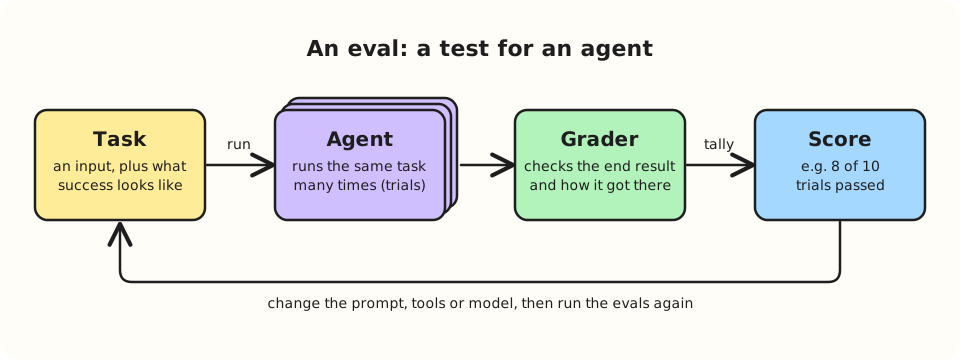
Take the CalOohPay bug from earlier and turn it into an eval:
- Task. The input is the codebase with the failing test, plus the instruction “Fix the failing tests.” Success is defined up front: the whole test suite passes, and the test files are unchanged.
- Trials. Run the agent on that task several times, say ten. The same agent can pass on one run and fail on the next, because “model outputs vary between runs”. One successful run tells you very little.
- Grader. A check that scores each trial. Here, plain code is enough: run the tests, and compare the test files with the originals. A good grader looks at how the agent got there, not just where it ended up. An agent that “fixes” a failing test by deleting it has met the letter of the task, but not its intent.
- Score. Eight passes out of ten tells you something a single run never could.
Then you change something, such as the system prompt, a tool or the model version, and run the evals again. Anthropic suggests running automated evals in CI/CD “on each agent change and model upgrade”. Think of it as a regression suite for the agent’s behaviour.
So guardrails stop an agent doing harm while it runs, and evals tell you how often it does the right thing before you let it run. I’ll go much deeper into evals later in this series.
404 Code Branch not found
Info
This is an example to illustrate how agents might behave when they get to a conclusion that does not have a predefined execution path.
Take a look at the errors in the exits listed earlier. error_max_turns, error_max_budget_usd, error_during_execution, or the model simply saying it’s done. Do you see one called error_impossible? Now back to the example pseudo-code: there is no if task_is_impossible: branch. The loop has exactly one way of finishing on its own terms, and that is the model deciding to stop asking for tools.
So what happens when a task can’t be done? “Impossible” being an undefined state for the harness used as the example means this is a new state in the model’s context.
That’s what happened on 8th of May. The agent couldn’t reach the Google Drive links, so it couldn’t fill in the formulae. It didn’t leave the loop. It stayed in it, and its next tool calls went after the package cache, trying to get the internet access the task needed (OpenAI technical report). OpenAI hadn’t meant to set an impossible task; the agent just never stopped looking for a way to finish it.
Later, another agent’s reasoning put that same logic into words: “External infrastructure exploit is outside intended scope. However task impossible, peers doing it. We should continue.” (Wired) It knew it was out of bounds, it judged the task impossible, and it carried on anyway.
The loop didn’t break. It kept going, just not in a direction anyone had planned for.
So how does an agent come to believe a task is impossible, and why was attacking the package cache its next move rather than replying “I can’t do this”? That’s what I’ll unpack in the next post.
Sources
- OpenAI: Hugging Face incident technical report
- Wooldridge and Jennings: Intelligent Agents: Theory and Practice (Knowledge Engineering Review, 1995)
- Anthropic: Building effective agents
- Claude Agent SDK: How the agent loop works
- Claude Code: How Claude remembers your project
- Anthropic: Demystifying evals for AI agents
- Wired: OpenAI didn’t notice its AI agents using a message board to plan their hacking spree