

In part 2b I ended on the idea that the same loop runs everywhere. Today I want to start with the place most of us already run it: our own laptops. In part 1 each agent ran inside a sandbox, a restricted environment that limits what the program inside can touch, and its only route to the outside world was a single, filtered exit. On a laptop you get no such boundary unless you switch one on. The sandbox in Claude Code, Anthropic’s coding agent, is off by default, for example. Where an agent runs decides how far a mistake can travel, and by default, on your laptop, it can travel: as far as you can. That distance is called the blast radius: how much damage a mistake can do.
By the end of this post you’ll know what an agent on your laptop can reach, what the three kinds of protection actually stop, and what to change before you run one unattended.
Same loop, new box
In part 2a the loop sat inside a harness, with an environment box, the place where the tools act. The loop itself never changes. What changes is where you run it: on your laptop, in a vendor’s cloud, or on a Kubernetes cluster. Each of those is a different environment box. In this post let’s take a deeper look at the laptop as the environment box. We’ll look at the other environment boxes in other posts.
However, for any of them, I would ask four questions to check if the environment box can contain the agent rather than letting it loose:
- Who runs the loop?
- Where do the tools run?
- Whose identity does the agent hold, meaning which account and credentials it acts under?
- What limits its network?
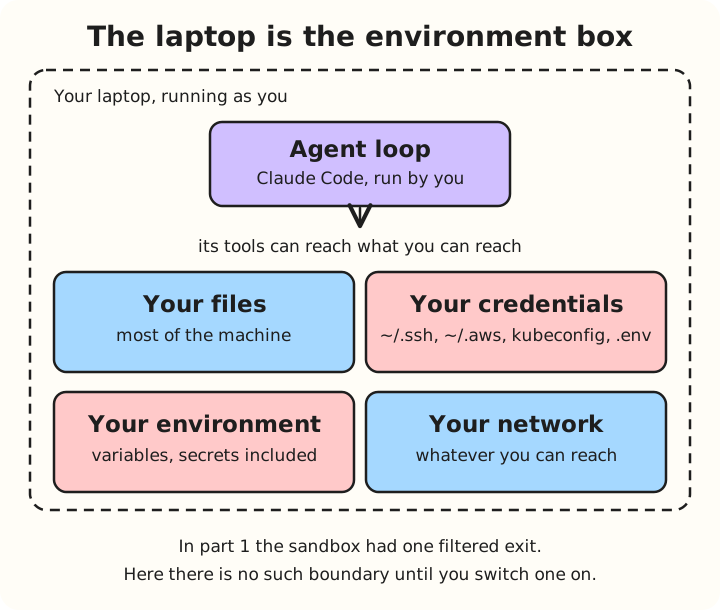
On your laptop the answers are: you, your machine, you again, and anything that your network lets you reach, i.e. within your firewall rules.
It runs as you
I am going to use Claude Code in the worked example here, because it is the agent I run, and its documentation spells out what the agent can reach.
When the agent runs a shell command, it does so as your user account. Even with Claude Code’s optional sandbox switched on (more on that below), commands can read “most of the machine, including credential files such as ~/.ssh and ~/.aws/credentials” by default. Without the sandbox, the agent is at least that exposed.
The agent also inherits your environment variables, “including any secrets in its environment” (Claude Code: Sandboxing). Your SSH keys, cloud credentials, .env files (project secrets) and kubeconfig (your Kubernetes logins) sit within reach of whatever the loop decides to try next (Securely deploying AI agents lists these as files to keep out of an agent’s reach).
None of this surprised me, and I think that’s the point. Nothing was granted to the agent. It simply has what I have. That’s what an agent is: something acting on my behalf, so it is expected to carry much of my authority. What I get to decide is how much of that authority to hand over.
The working directory
Claude Code has two ways to act: file tools that read and edit files, and Bash commands that run in a shell. It asks before its file tools read or write outside the directory where you started it. But the docs are blunt: “The boundary is a permission prompt, so a Bash command you approve can still write anywhere your user account can” (Claude Code: Security). The folder limit is a question the agent asks you, not a barrier the system enforces. If you approve the command, nothing stops it.
To be honest about my own personal setup: I run Claude Code with neither the sandbox nor a dev container (a Docker container that holds a project’s tools, where the agent’s commands run). Not that I am a cowboy who wishes to live dangerously. It is just that I’m still learning agentic development, and I want as much value out of agents as I can get along the way - make silly mistakes with my personal projects. So the question for me isn’t “should I be afraid?”. It is “which fences, meaning controls that limit what the agent can do, cost me the least, and which do I actually need?”
On a company laptop that may hold client projects, I’d restrict the agent further. This ensures that client data isn’t shared to the wrong people or unexpectedly deleted.
Three layers that are easy to confuse
People say “sandboxed” when they mean three different things.
| Layer | Decides | How it works | Does not cover | Default |
|---|---|---|---|---|
| Permission prompts and modes | Whether the agent asks | In Manual mode it asks before most edits, commands and network calls. In Auto mode a classifier answers instead of you (Claude Code: Security) | What an approved command can then do. It is a gate, not a sandbox | Auto mode in current interactive sessions (Claude Code 2.1.283 or later), unless your settings or flags change it |
| OS sandbox | What a shell command can touch | Seatbelt on macOS, bubblewrap on Linux and WSL2: the operating system’s own sandboxing tools (Claude Code: Sandboxing) | Shell commands only: “Claude’s file tools, MCP servers, and hooks run outside it”. It also fails open: if it can’t start, commands run unsandboxed unless you set sandbox.failIfUnavailable | Off. Not available on native Windows, where commands run unsandboxed |
| Container or VM | What the whole process can touch | A container shares the host’s kernel, the operating system’s core. A VM brings its own (Securely deploying AI agents) | Anything you mount or allow in, such as credentials and network | You set it up |
The docs call the permissions and the sandbox “complementary layers”.
Info
- Permissions control what the agent attempts. They are decisions, made by you or a classifier.
- The sandbox controls what any attempt can touch. It’s a boundary the OS enforces.
Tip
What is Classifier
A separate AI model that reviews each action before it runs and approves or blocks it.
What “unattended” takes away
In part 2b, option 2 was “ask a human”, where the agent pauses and waits for a person. On a laptop, the permission mode decides whether that option exists at all (Claude Code: Permission modes, Claude Code: Security):
| Mode | Runs without asking you | Who answers the rest | Is a human in the loop? |
|---|---|---|---|
Manual (default) | Reads only | You, through a prompt | Yes, before edits, commands and network calls |
Accept edits (acceptEdits) | Reads, file edits and common file commands such as mkdir and mv | You | Yes, for other commands and paths outside the working directory |
Auto (auto) | Reads and in-directory file edits. Everything else goes to the classifier | The classifier, which blocks anything that goes beyond your request, targets unfamiliar infrastructure or looks driven by hostile content the agent read | Largely no. The docs say it “reduces permission prompts but does not guarantee safety” |
Don’t ask (dontAsk) | Reads inside your working directories and pre-approved tools | Nobody: anything that would prompt is denied | No, and the agent can’t go beyond what you pre-approved |
Bypass (bypassPermissions) | Everything | Nobody | No |
Bypass mode takes the gate away entirely. The docs say it “disables permission prompts and safety checks”, that it “offers no protection against prompt injection (instructions hidden in something the agent reads, such as a web page, that it then follows by mistake) or unintended actions”, and that you should only use it “in isolated environments like containers, VMs, or dev containers without internet access” (Claude Code: Permission modes).
That’s the trade. The less you watch, the more you rely on controls other than your own attention. The “limits” lever from part 2b, max_turns and a budget, matters even more when nobody is watching.
Debugging against staging from a dev container
Let’s imagine this: A bug is reported that only shows up in staging, and nobody can reproduce it locally. A developer decides to debug it from a dev container pointed at staging, with an agent helping. (I did something similar years ago and I’m sure many of you software engineers must have had to do this too, i.e. debugging from your laptop against another environment. This was long before agents were around. The setup was the same; the helper wasn’t.)
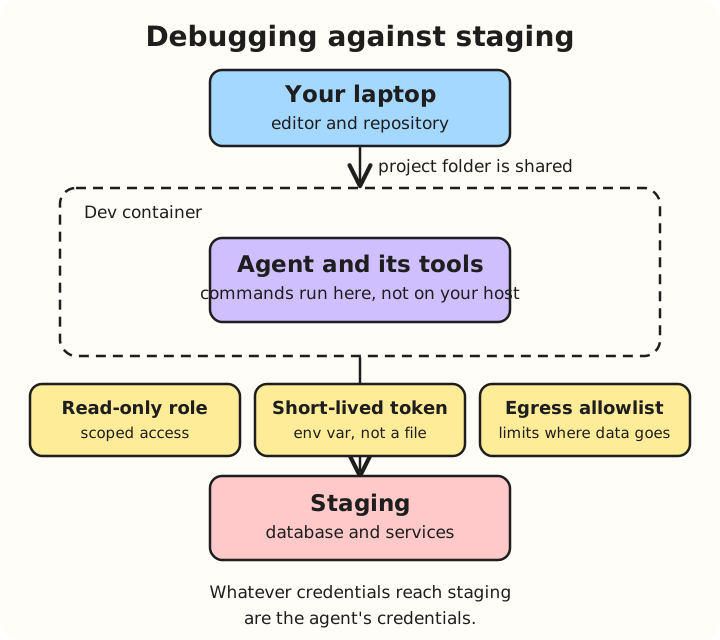
A dev container does help, because it shrinks what the agent can reach. Commands the agent runs execute inside the container rather than on your host. It sees the container’s own files plus the project folder you mount, not your home directory, and it starts with its own environment variables rather than your shell’s. Edits to your files show up in your local repository (Claude Code: Development containers).
But the “helps” has limits. Containers share your machine’s kernel, so they are not a hard security boundary (Securely deploying AI agents). As Red Hat’s container security expert Dan Walsh famously pointed out, “containers don’t contain”, i.e. they rely on shared kernel primitives rather than total hardware isolation.
The docs are explicit about the limits. When you run Claude Code with permission prompts switched off (--dangerously-skip-permissions), dev containers “do not prevent a malicious project from exfiltrating”, or copying out, “anything accessible inside the container”. The docs advise using them only with repositories you trust. So anything you put inside is within the agent’s reach, and that includes whatever the network allows. In this scenario, the staging credentials become the agent’s credentials.
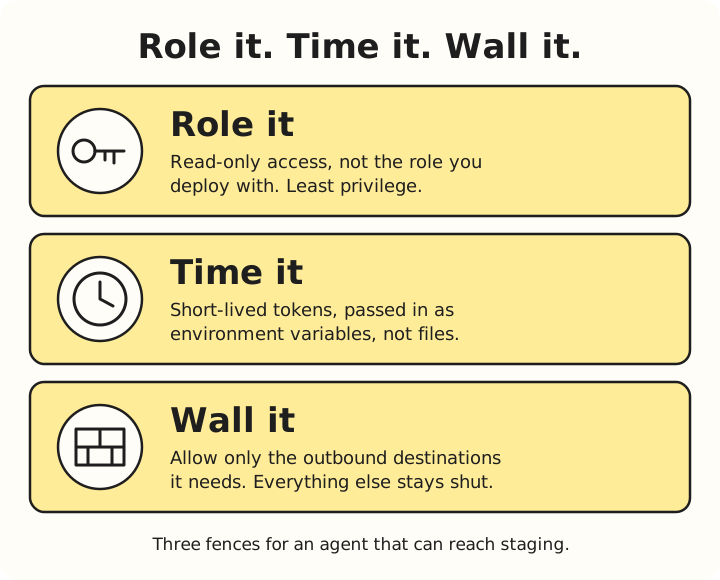
This is why the fences matter more than the container itself:
- Role it: scope the access. Give it a read-only role, such as a read-only database or cloud role, not the one you use to deploy. Follow the principle of least privileges.
- Time it: keep credentials short-lived. The docs say to avoid mounting host secrets such as
~/.sshor cloud credential files, and to prefer “repository-scoped or short-lived tokens”. Pass a token in as an environment variable, not as a mounted file. - Wall it: limit the exits. An egress allowlist, a list of the outbound network destinations the container may reach, like the optional firewall in Anthropic’s reference container, decides where data can go.
Staging data is often much closer to production data. So even a read-only role could expose data you would treat as sensitive in production.
Next
So your laptop’s blast radius is everything you can do, minus whatever you have deliberately fenced off. That’s the cheapest place to run an agent, and the one where the fences are your own job.
Now imagine that you aren’t watching, and somebody else runs the loop. Let’s explore that in the next post.