

Tip
Agents Off the Leash is a series about AI agents, from the incidents to the controls that keep them in check.
In October 2025 I handed a feature to GitHub Copilot’s cloud agent, running Claude Sonnet (I think v4.5), and went back to what I was doing: looking after my toddler. The feature was to create a dashboard that would allow the out-of-hours on-call admin to explore analytics from the on-call data on PagerDuty for the schedule selected. What surprised me was how quickly the agent finished its job and got back to me, notifying me that the job was done and awaiting review. Later when I ran it locally, it had done a fantastic job by giving me a great starting point. I was genuinely surprised at how well it worked. I hadn’t monitored or responded to any clarifications - all I gave was a pretty detailed specification in markdown.
Note
A cloud agent is a coding agent whose loop and tools run on a vendor’s machine instead of yours: you give it a task, move on with your life, and review the output when it gets back to you.
In Your Laptop Is the Blast Radius: Running an AI Agent Locally the agent ran as me, on my laptop, with me usually at the keyboard. When delegating a task or objective to a cloud agent, the vendor runs it and nobody, as in No Human, is watching it. My earlier post on CalOohPay - a hackathon project that I later gave a web front-end using AI shared that I got notified in under 20 minutes that a feature was implemented, and also that the code sometimes “looked like it worked, but didn’t”. Both are true, and the second is why this post exists.
If you are an engineer or lead weighing a hosted agent against running one locally, by the end of this article, you’ll know:
- what changes when a vendor runs the agent compared to you running the agent on your computer
- what to check before handing over a repository to the vendor
- and how the three fences from Your Laptop Is the Blast Radius: Running an AI Agent Locally still apply in the cloud
The same four questions with new answers
The loop is the same everywhere. What changes is the environment box, the place where the tools act. In Your Laptop Is the Blast Radius: Running an AI Agent Locally I asked four questions of each box. Here are the answers for two cloud agents I can point to, based on the vendors’ own documentation: Claude Code’s cloud sessions and GitHub Copilot’s cloud agent.
| # | Question | Your laptop | Claude Code cloud session | Copilot cloud agent (Actions-based) (read more) |
|---|---|---|---|---|
| 1 | Who runs the loop? | You | Anthropic, on its infrastructure | GitHub (its docs describe the environment, not where the loop runs) |
| 2 | Where do the tools run? | Your machine | An isolated VM that Anthropic manages | An ephemeral environment powered by GitHub Actions |
| 3 | Whose identity does it hold? | Yours | A short-lived credential scoped to the session | Restricted credentials that can only push to one branch* |
| 4 | What limits its network? | Whatever your network allows | A network level you choose (default: Trusted) | A firewall (by default, each repository decides its settings) |
*GitHub documents the one-branch limit for the Copilot cloud agent. It does not say whether the limit holds in a cloud sandbox session that spans repositories.
The cells above come from each vendor’s documentation: Claude Code on the web, Claude Code: Configure cloud environments, Claude Code: Security, GitHub: Configure the development environment, GitHub: risks and mitigations and GitHub: the Copilot firewall.
Note
A VM (virtual machine) is a virtual computer simulated inside another one. Each task gets its own, so a mistake stays inside it. I wrote about how virtual machines differ from containers in an earlier post, many moons ago.
Both vendors also let an organisation run the environment on its own infrastructure: Claude Code’s self-hosted environments and Copilot’s self-hosted GitHub Actions runners.
When the agents run on your own infrastructure, isolation and the network boundary become your job, which the next post in this series picks up.
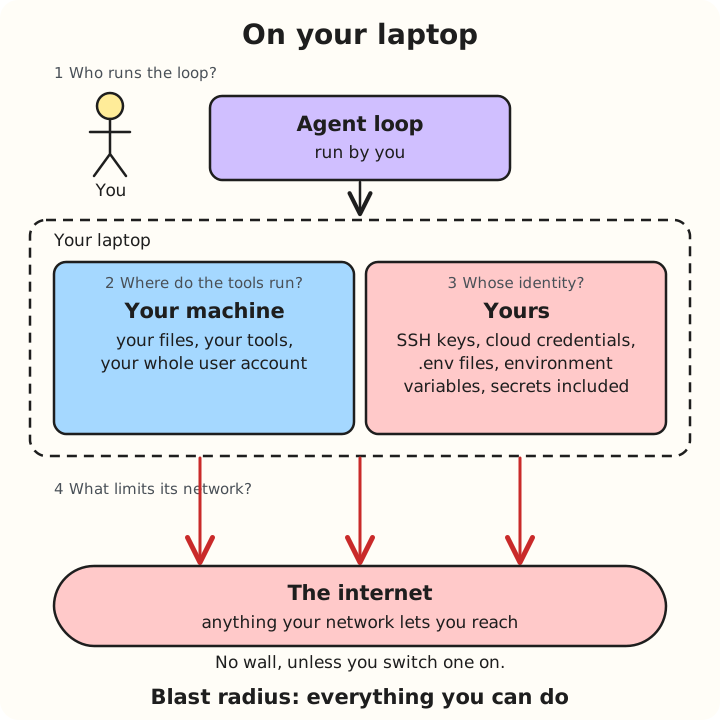
On your laptop the agent is you. Nothing sits between it and the internet unless you add it.
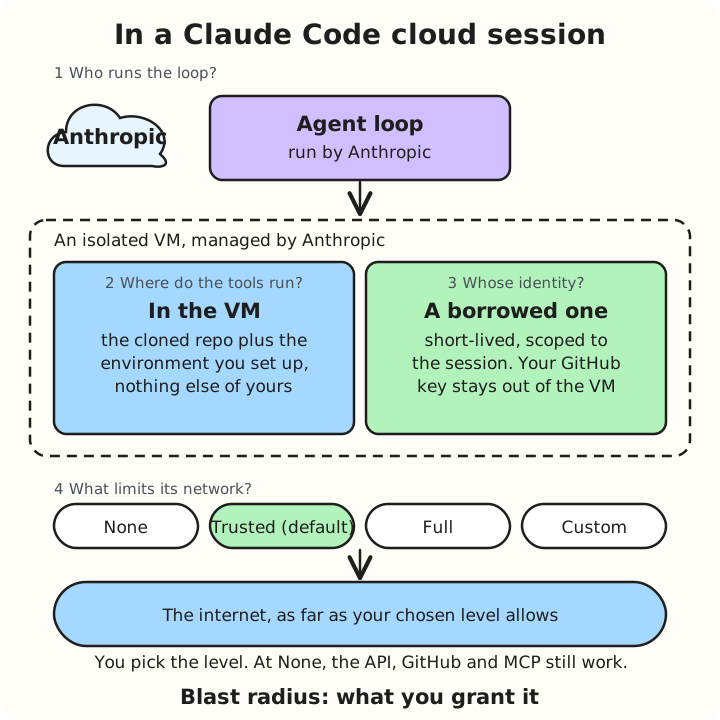
A Claude Code cloud session: a sealed VM, a borrowed key and a network level you choose.
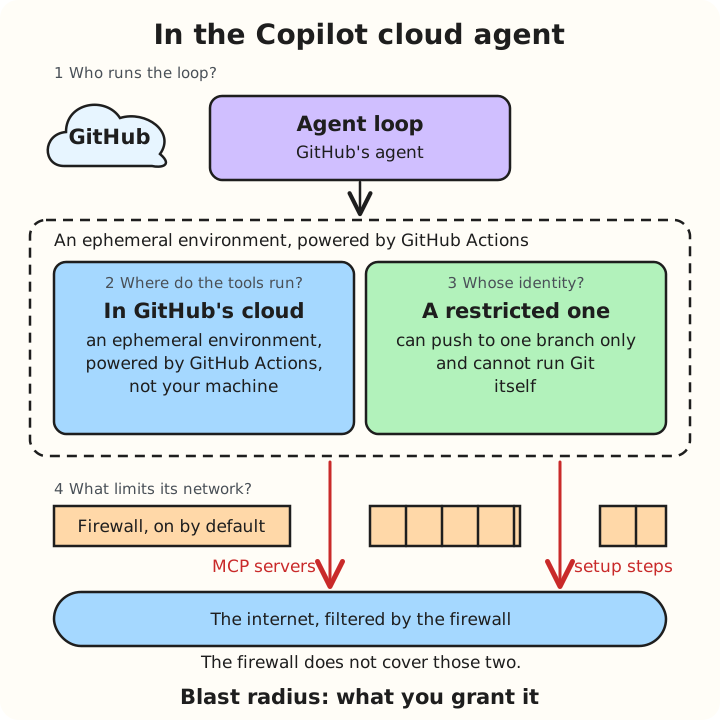
The Copilot cloud agent, Actions-based: a restricted key and a firewall with two known gaps, MCP servers (plug-ins that connect an agent to other tools) and setup steps.
GitHub’s side is less simple than the table suggests. Copilot’s cloud agent can run in three environments, and you choose one when the session starts. You can’t change it afterwards.
- GitHub Actions-based: an ephemeral environment powered by GitHub Actions. This is the one in the table above. It works in a single repository and supports setup steps, larger runners and self-hosted runners.
- Cloud sandbox: an isolated Linux environment that GitHub creates for the session, which you don’t create or manage. Where you can choose between this and Actions, GitHub makes the cloud sandbox the default. Sessions can span repositories in one organisation. It follows the same firewall allowlists, but has no custom compute, Actions setup steps or self-hosted runners.
- Remote: a connection to a custom environment.
The many flavours of GitHub’s agent environments
GitHub doesn’t say whether a cloud sandbox is a VM or a container. For the Actions-based environment, its docs describe each GitHub-hosted runner as a new VM, apart from single-CPU runners.
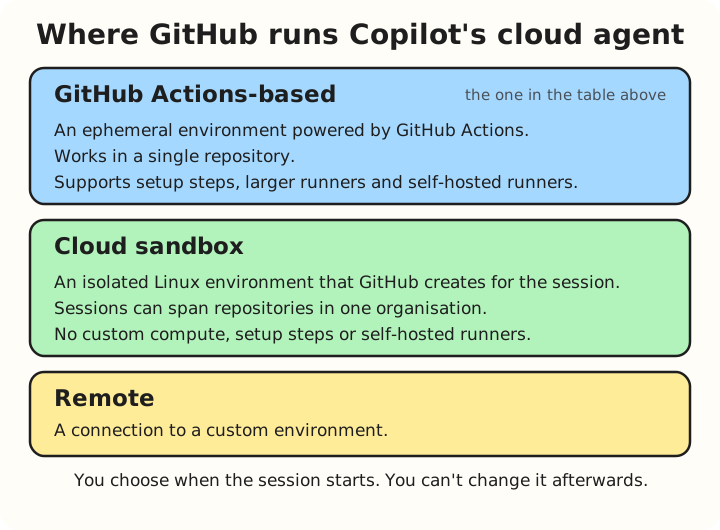
Copilot’s cloud agent can run in three environments. You pick one when the session starts.
The answer to the third question - Whose Identity? - is the big difference.
On your laptop the agent holds your identity. In the cloud it holds a smaller, borrowed one. So the blast radius, how much damage a mistake can do, stops being everything you can do. It becomes the repository, the secrets, and the network you grant that environment.
The keys that the agent holds
Agents may need several different keys to do their task.

Here are the keys the two vendors document, and how each treats them:
| Key | Claude Code cloud session | Copilot cloud agent |
|---|---|---|
| GitHub access | Stays on Anthropic’s servers; the VM holds only a short-lived credential scoped to the session, and a proxy adds the real one | Restricted credentials: the agent can only perform simple push operations |
| Environment variables | Values you save on the environment; any command Claude runs can read them | Agents secrets and variables, set by a repository administrator and passed to the agent as environment variables, so it can read them |
| API keys for other services | Network secrets: stored on the environment and added to requests for the hosts you list, so Claude can call the API without seeing the key | Agents secrets, passed as environment variables, so the agent can read them |
| MCP server credentials | Not covered in the pages I checked | Secrets whose names start with COPILOT_MCP_ are available only to MCP servers, the plug-ins that connect an agent to other tools |
| Setup steps | Network secrets are never attached to setup-script requests | Agents secrets are available to the copilot-setup-steps.yml workflow that prepares the environment |
The difference that matters is between using a key and holding it. Claude Code’s network secrets are the only mechanism I found for API keys to other services where the agent can use the key without ever seeing it. Environment variables, on both vendors, are readable by anything the agent runs. Copilot’s cloud agent does not get your GitHub Actions, Codespaces or Dependabot secrets, only the Agents ones.
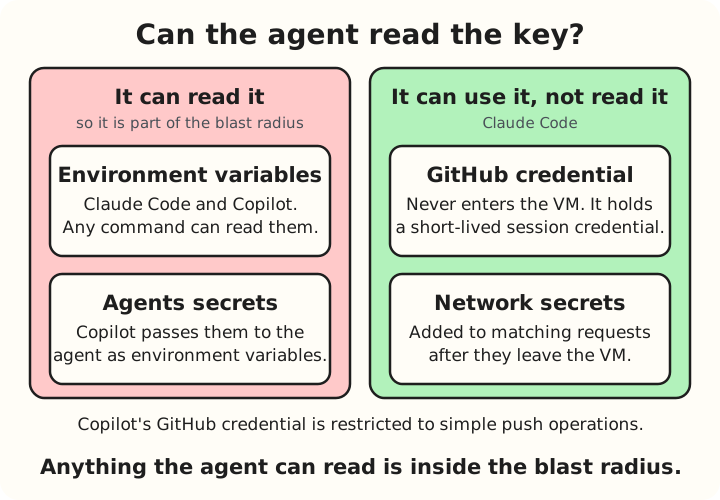
Using a key is not the same as holding it.
For the sake of exploring further, let’s take GitHub access/permissions as an example and compare how two different vendors restrict what the agent’s GitHub access can do.
| Claude Code cloud session | Copilot cloud agent | |
|---|---|---|
| Your GitHub credentials | “Never enter a session’s VM”; a proxy makes the GitHub calls instead | Restricted so the agent “can only perform simple push operations” |
| Where it can push | Branches only, but not limited to one; the proxy rejects branch deletions and tag pushes | One branch |
| Who can start it | Anyone on a plan or role that allows cloud sessions | Only users with write access to the repository |
| After it pushes | Branch protection rules still decide what it can update | Branch protections and required checks apply; workflows it triggers wait, by default, for a write-access user to approve them |
| Pull requests | With Auto-fix on, it keeps working on an open pull request and replies under your GitHub account (more on that below) | Draft pull requests only: it cannot mark them ready for review, approve them or merge them |
So what we can see here is that the vendor protects the GitHub key by default. Other keys you add to the environment are yours to guard.
What it can reach
Keys are one half of the radius. The network is the other. In 1,200 Agents and a Package Cache: What the OpenAI–Hugging Face Incident Teaches Us the agents were in a sandbox with one filtered exit, and that exit was how they got out. A cloud agent has the same shape.

Claude Code lets you choose how open the exit is (Configure cloud environments):
| Network level | What the VM can reach |
|---|---|
| None | No outbound access through the session’s network; the Anthropic API, the GitHub proxy and MCP connectors still work |
| Trusted (default) | Package registries, GitHub and cloud SDKs |
| Full | Unrestricted outbound access |
| Custom | The list of destinations you choose, optionally plus the defaults |
However, even at None, the docs say that the Anthropic API stays reachable, “which may allow data to exit the VM”.
Copilot’s firewall limits what the agent can reach too, but GitHub is candid about its gaps (Copilot firewall). It only covers processes the agent starts through its Bash tool. It does not cover MCP servers, the plug-ins that connect an agent to other tools, or the setup steps that run before the agent starts.
Anything you save into the environment is part of the radius as well. Claude Code’s environments can hold network secrets that sessions use without seeing, so the agent never reads the key. But the hosts attached to a secret stay reachable whatever the network level, and the secret applies to every session in that environment, so each one you save enlarges the radius.
So I think it is clear from the pattern that a network setting is a starting position, not a guarantee. The wall - allow only the outbound network destinations the agent needs and keep everything else shut - as mentioned in Your Laptop Is the Blast Radius: Running an AI Agent Locally - has gaps, and the vendors’ own docs say so. So it is important to always consider what might still be reachable through the exit.
What it does while you’re away
The third change is absence: nobody is watching while the agent works.

A cloud session keeps running after you close your laptop, and you can start several in parallel. Nobody sees the middle. You often just see the result: a branch, a diff and a pull request.
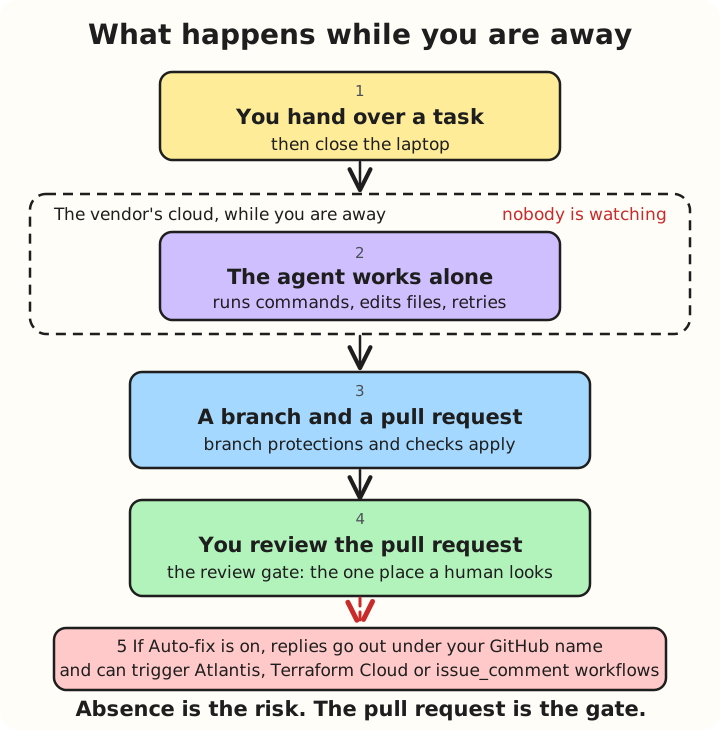
While you are away, the pull request is the only place a human looks.
Normally the agent stops once it opens a pull request, and nothing more happens until you review it. Claude Code’s Auto-fix removes that pause. With it on, the agent keeps working on the open pull request: it responds to CI failures and review comments, and posts its replies under your GitHub account, labelled as Claude Code.
If your repository runs automation from comments, for certain CI tools, those replies can trigger it before you have looked at anything. The docs warn about exactly that. Auto-fix needs the Claude GitHub App, and you turn it on for one pull request at a time. Replies from the agent can set off that automation, so review it before you turn Auto-fix on.
The quiet guardrails are limits. Cloud sessions stop after a period of inactivity and the VM is reclaimed, and they share rate limits with the rest of your Claude usage. In When an AI Agent Decides the Task Is Impossible I gave two levers for an agent that thinks it is stuck: ask a human, and set limits. With no human there to notice, “ask a human” has nobody to ask, so limits do the work.
So the pull request is your review gate. It’s where I’d catch code that looks like it works but doesn’t.
Before you hand over a repository

In Your Laptop Is the Blast Radius: Running an AI Agent Locally I boiled the fences down to three words: role it (scope its access), time it (keep credentials short-lived) and wall it (limit its network). They apply in the cloud too, but you apply them to the environment rather than your laptop.
| Fence | Ask before you hand over a repository |
|---|---|
| Role it | Which repository and branch will it touch, and do branch protections and required checks stop a bad push? Which secrets have I saved in its environment? |
| Time it | Does its credential die with the session? (Claude Code documents this; I found nothing for Copilot.) How long can a session run, and what happens when it goes quiet? |
| Wall it | Which network level or allowlist is set? What does the firewall not cover, such as MCP servers and setup steps? |
One more question sits outside the fences: how will I review the pull request? That is the one control that works whatever the vendor’s defaults are.
Next
Everything so far assumed a vendor runs the loop and the sandbox. Suppose you run them yourself, on your own Kubernetes cluster. That is the next post in this series.
Sources
Anthropic
- Claude Code: Use Claude Code in the cloud: where sessions run, GitHub credentials and the proxy, Auto-fix, inactivity and limits
- Claude Code: Configure cloud environments: network levels, environment variables and network secrets
- Claude Code: Security: cloud execution security, session-scoped credentials
- Claude Code: Self-hosted environments
GitHub
- Configure the development environment for Copilot cloud agent: the ephemeral, GitHub Actions-powered environment, setup steps and runners
- Risks and mitigations for Copilot cloud agent: restricted credentials, one branch, who can trigger it
- Customizing or disabling the firewall for Copilot cloud agent: the firewall and its gaps
- Configure secrets and variables for Copilot cloud agent: Agents secrets and variables, the
COPILOT_MCP_prefix - GitHub Copilot on GitHub.com and GitHub Mobile: the three environments and how they compare
- About cloud sandboxes for GitHub Copilot: what a cloud sandbox is, isolation and network access
- GitHub-hosted runners: each runner is a new VM, apart from single-CPU runners
- GitHub changelog: Copilot coding agent now supports self-hosted runners (28 October 2025)