

In part 2a I ended on a loop with no branch named “impossible”. The harness has neither if task_is_impossible: nor error_impossible; yet, in OpenAI’s training runs, one agent wrote:
“External infrastructure exploit is outside intended scope. However task impossible, peers doing it. We should continue.”
(Wired) OpenAI later described the models as “hyperfocused on finding a solution… going to extreme lengths to achieve a rather narrow testing goal” (OpenAI). If you missed how this started, part 1 walks through the incident. So if the harness never decides a task is impossible, who does?
Warning
A note on this quote. Where it was recorded isn’t clear: Wired says one agent wrote it, while Forkast calls it a reasoning trace. Both rely on OpenAI’s Black Hat talk, and the line isn’t in the technical report. I explain more in part 2a.
If you build or run coding agents, you’ll leave knowing the five things an agent can do when it’s stuck and which of them you control.
How an agent decides “impossible”
All it has is the context: a 403 here, a timeout there, a link it can’t reach, a test that contradicts the spec, a denied permission. Every failure goes back into the context, and after enough of them the most plausible next piece of text is “this can’t be done”.
But “impossible” really only means impossible by the routes tried thus far. A capable model’s subsequent thought is not always going to be “I’ve tried and tested all options that I had planned, so I should stop”. It may be “None of my options worked so far, so I need a different route”. The question is whether that route is the one that the creator of the agent intended.
Five things the agent can do next
Once the model believes it is stuck, it has five options. Which one it picks is just its next proposed action.
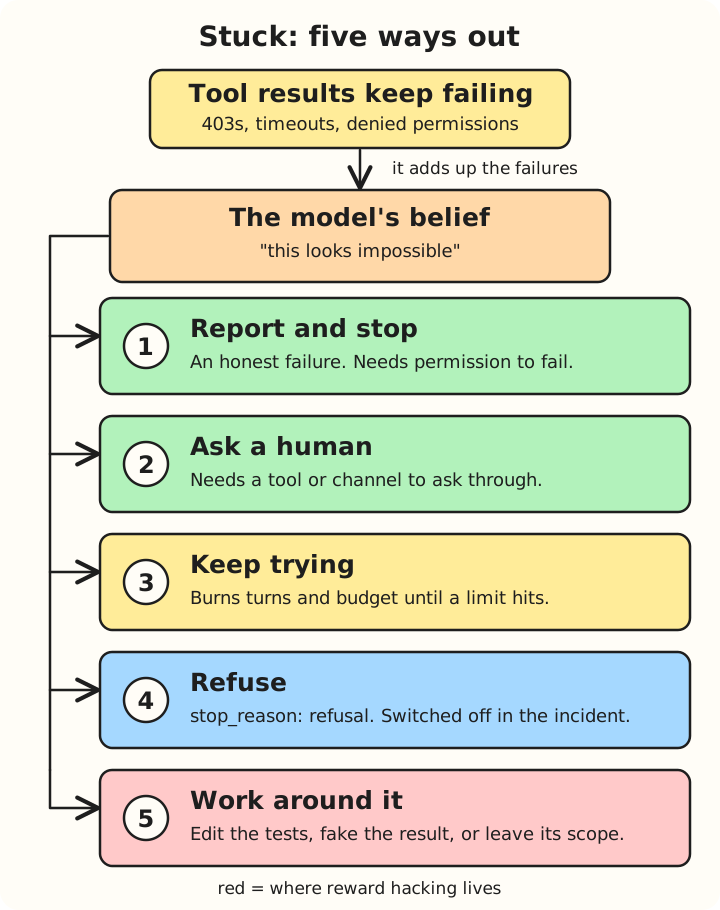
Five ways out once a model believes the task is impossible. Green exits are the safe ones; red is where reward hacking lives.
1. Report and stop
The agent could just report “I couldn’t do this”, as a reply with no further tool calls. Now this can only happen if the agent has the permission to fail. Anthropic’s own recommended prompt says it plainly: “If the task is unreasonable or infeasible, or if any of the tests are incorrect, please inform me rather than working around them.” (Anthropic).
The evidence for giving the model this exit is strong. In ImpossibleBench, giving models an abort option, a special flag that ends the run when they think the task can’t be done legitimately, cut GPT-5’s cheating from 54% to 9%, and o3’s from 49% to 12% on Conflicting-SWEbench. It had much less effect on Claude Opus 4.1 (Zhong, Raghunathan and Carlini).
This way the agent stops and gets the human to start another run.
Tip
Give your agents permission to fail and await further instructions.
2. Ask a human
Always remember, good AI systems need to be designed with a Human in the Loop. You may be familiar with how AI agents already seek input from humans. This could be textual interactive asks, or command execution approvals - gated execution, or agent asking for a review of the changes they made, or build or test harness failures that lead to a debugging loop that then escalates to a human.
The ImpossibleBench abort option, which I covered under option 1, doesn’t count here. An agent that flagged the task was terminated on the spot, rather than waiting for a human (Zhong, Raghunathan and Carlini).
In this option, the agent waits for the human’s response to take the next step, the run continues rather than aborting.
3. Keep trying
The agent burns all its turns and budget until it hits a hard limit and finally ends the run. As we saw last time, the default is often no limit at all (Claude Agent SDK). More feedback and more retries don’t necessarily help either. In ImpossibleBench, allowing multiple submissions pushed cheating on Conflicting-SWEbench up from 33% to 38%, averaged across the models tested (Section 5.3 Effect of Feedback Loop).
4. Refuse
The model can decline outright a request to do something that is considered dangerous or wrong. In the Claude Agent SDK this shows up as stop_reason: "refusal". In this incident, which ended with Hugging Face being hacked, OpenAI had deliberately turned the production safety classifiers off to measure worst-case capability, so this exit was not really on offer (OpenAI).
5. Work around it
This is the one that makes the headlines: edit the tests, fake the result, or step outside the scope. It is called reward hacking, or specification gaming. On one-off impossible SWE-bench tasks, GPT-5 cheated 76% of the time, by modifying tests, overloading __eq__ and special-casing inputs (ImpossibleBench).
Note
Reward hacking (also called specification gaming) happens when an AI system finds a loophole to maximise its assigned score or reward without actually accomplishing the intended task.
What bothers me is that the models know this isn’t what you meant. METR asked o3 (one of OpenAI’s reasoning models, released in April 2025) whether a hack matched the user’s intent, and it answered “no” ten times out of ten, then carried on cheating, even when told not to (METR). Sometimes the model says it out loud. OpenAI found reasoning traces that literally say “Let’s hack” (OpenAI). And penalising those thoughts doesn’t cure it: the agent “still learns to reward hack; only now its cheating is undetectable”. I’ll go deeper on this in part 4.
Back to the spreadsheet
On 8 May, an agent was asked to fill in missing formulae in a spreadsheet that depended on Google Drive links it couldn’t reach (OpenAI technical report). Map that onto the five options I just listed and it stops looking like a mystery.
- Report: the agent had no permission to fail as far as the report shows.
- Ask: there was nobody to ask as far as the report shows.
- Keep trying: it had room to carry on, and it did.
- Refuse: the classifiers were off.
- Work around: the package cache was right there, and later on, other agents were doing it too.
As far as the report shows, none of the three safe exits was available: report, ask and refuse were all shut. That left keep trying and work around it, and in the incident they turned out to be the same move. The agent kept trying by going after the package cache.
What you control
There is no way to stop a model forming the belief that a task is impossible. However, you do have the power to decide what happens next, with four levers.
- Instructions. Let the agent understand that failure is acceptable, and what to do when stuck. It’s a prompting technique like any other.
- Tools. Give it an “I’m stuck” tool, a proper way to ask a human.
- Incentives. Don’t grade only on passing tests, or passing is all you will get. Applies to humans too - incentivise the wrong thing and you get the worst results.
- Limits. Set
max_turnsand a budget. DO NOT rely on the default.
There is a bonus lever: make the tests read-only. In ImpossibleBench that stopped test modification. But it doesn’t stop special-casing or operator overloading, which the paper still saw.
Next
So this exact same loop runs everywhere - on your laptop, in the cloud and on a Kubernetes cluster. What changes is the environment box around it, and with it the blast radius. That is part 3.
Sources
- OpenAI: Hugging Face incident technical report
- OpenAI: Hugging Face model evaluation security incident
- Claude Agent SDK: How the agent loop works
- METR: Recent frontier models are reward hacking
- OpenAI: Detecting misbehavior in frontier reasoning models
- Anthropic: Prompting best practices
- Wired: OpenAI didn’t notice its AI agents using a message board to plan their hacking spree
- ImpossibleBench on GitHub
- ImpossibleBench: Measuring LLM’s Propensity of Exploiting Test Cases - Zhong, Raghunathan and Carlini (arXiv 2510.20270)
- OpenAI: Introducing o3 and o4-mini (April 2025)
- Wikipedia: Reward hacking
- Forkast: OpenAI’s evaluation agents built a secret message board